testyourcolumn.org  
 

Step-By-Step Instructions To Test Your HPLC Column

Step 1: Purchase the Test Your Column test mixture

You can purchase 1.5 mL of the the Test Your Column test mixture here. They are offered at cost, for $40 with domestic ground shipping or for $130 with international shipping.

The standard solution contains the following compounds dissolved in 50% acetonitrile/50% water (by volume):

100 µM thiourea,
50 µM N,N-diethylacetamide
100 µM N-propylaniline
200 µM 1,3-naphthalenediol
100 µM diphenylamine
100 µM 4-n-hexylaniline
100 µM naphthalene acetamide
200 µM 2-phenylindole
100 µM N,N-dibutylaniline
10 µM tetrabutylammonium chloride
200 µM (±)-cis-trans-abscisic acid
10 µM tetrapentylammonium bromide
100 µM prednisone
100 µM cortisone
100 µM hydrocortisone
100 µM curcumin

Step 2: Prepare your mobile phase

The mobile phase must be 0.1% (by volume) formic acid in 50% acetonitrile (by volume). It must be prepared as precisely as possible. Measure out each of the mobile phase components gravimetrically according to the following protocol:

1) Measure out 249.0 g LC-MS grade water in a 1 L bottle.
2) Add 196.6 g LC-MS grade acetonitrile to the bottle and mix thoroughly.
3) Measure out 0.610 g of formic acid (we use ≥99.5% purity from Fisher Scientific) in a small 10 mL vial.
4) Transfer about 8 mL of the water/acetonitrile mixture from the 1 L bottle into the vial containing the formic acid.
5) Pour the contents of the vial into the 1 L bottle.
6) Repeat steps 4 and 5 three more times.
7) Thoroughly mix the contents of the 1 L bottle.

Step 3 (optional): Measure your instrument dead time

The "instrument dead time" is the time it takes an unretained solute to reach the detector when the HPLC column is removed. It is only needed if you wish to measure accurate retention factors. Selectivity parameters will not be affected. You will only need to measure this once unless you reconfigure the tubing (inner diameter/length) between the point of your sample injection and the detector.

To measure your instrument dead time, replace your HPLC column with a union. Then run the Test Your Column test mix in a 1 min long isocratic method at a relatively low flow rate (200 µL/min is fine). Scan for the 242 m/z ion (tetrabutylammonium). Use a sampling rate of at least 5 Hz if possible. The retention time you measure is your instrument dead time at that flow rate.

Important: Remember that your instrument dead time is a function of flow rate. For example, if you change the flow rate to one twice as fast as the one in which you measured your instrument dead time, divide your instrument dead time by 2.

Step 4: Run the test mixture

Run the test mixture under the following conditions:

1) The mobile phase must be 0.1% formic acid in 50% acetonitrile (see Step 2 above).
2) The column temperature must be set to 40 °C.
3) The mass spectrometer must be set to scan the following masses (a data rate of 2 Hz is usually best):

77.0 m/z (thiourea)
116.1 m/z (N,N-diethylacetamide)
136.1 m/z (N-propylaniline)
161.1 m/z (1,3-naphthalenediol)
170.1 m/z (diphenylamine)
178.2 m/z (4-n-hexylaniline)
186.1 m/z (naphthalene acetamide)
194.1 m/z (2-phenylindole)
206.2 m/z (N,N-dibutylaniline)
242.3 m/z (tetrabutylammonium)
265.1 m/z (±)-cis-trans-abscisic acid
298.3 m/z (tetrapentylammonium)
359.2 m/z (prednisone)
361.2 m/z (cortisone)
363.2 m/z (hydrocortisone)
369.1 m/z (curcumin)

Step 5 (optional): Convert your LC-MS data file into a supported, open-source file format

If you wish to have the Test Your Column software automatically extract retention times and other peak information from your LC-MS data file, you must first convert it to one of three supported open file formats. These include the mzXML (*.mzXML), mzML (*.mzML), and AIA or netCDF (*.CDF) formats. If you wish to enter the retention times in manually, you can skip this step.

First, download ProteoWizard and install it on a computer running Windows. Proteowizard is free software that makes is easy to convert LC-MS data files into several different open-source formats.

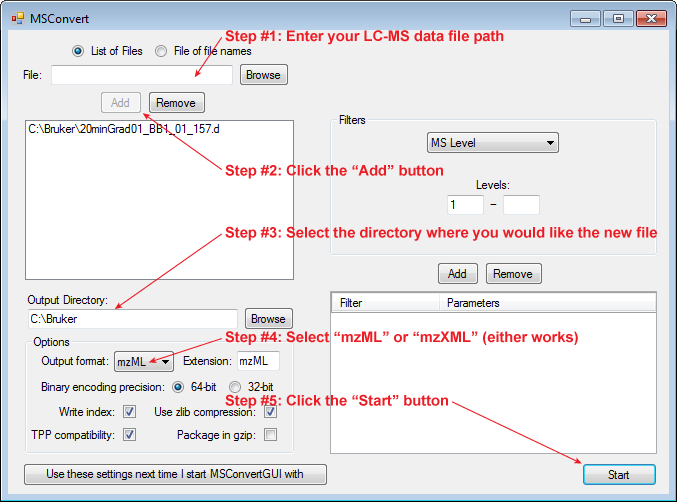
After installing ProteoWizard, you will have a new program group for ProteoWizard in your start menu. Find the program called "MSConvert" and run it. Then follow the instructions below:

Step 6: Run the LC-MS Column Tester application...

Click on the following link to run the LC-MS Column Tester application:

Launch the LC-MS Column Tester application

After clicking on the above link, a window will ask you to either open or save "columntesterapp.jnlp". Make sure "Open with" and "Java(TM) Web Start Launcher" are selected and then click "Ok".

Note: Some browsers may open the contents of columntesterapp.jnlp instead of running it. In that case, follow the instructions below for "Running LC-MS Column Tester Offline".

Once the application launches, you will see the following window:
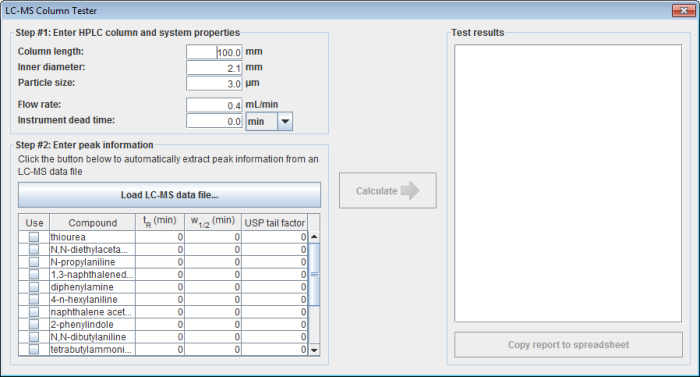
In this window, enter the following information:

1) Enter your column length and column inner diameter in millimeters.

2) Enter the particle diameter of your stationary phase. The particle size is used to approximate an expected efficiency for your column. It is also used to estimate the best level of filtering for your data when the software automatically extracts peaks.

3) Enter the flow rate you used when you ran the test mixture.

4) Enter the instrument dead time/volume. The selection box next to the instrument dead time box lets you select whether you want to enter it as a time or as a volume. If you enter it as a time, be sure it is scaled correctly for the flow rate used in the gradient.

5) Enter the retention times (tR) you measured for each of the standards in the Test Your Column test mix. You can manually enter in all the values or you can click the "Load LC-MS data file..." button to automatically extract the retention times from an mzXML, mzML, or netCDF file of the LC-MS run (see Step 5 above).

Try it out! Right click the link below and select "Save link as..." to download an example mzXML file. It was acquired on a 2.1 x 150 mm column (5.0 µm particles) with a 0.4 mL/min flow rate. The instrument dead time was 0.091 min.

ExampleChromatogram.mzXML

6) Click on the "Calculate" button to generate a column evaluation report containing:

  • Retention factors for each compound (k)
  • Column selectivity parameters including
  • Hydrophobicity (HMS)
    Steric interaction(S*MS)
    Hydrogen bond acidity(AMS)
    Hydrogen bond basicity(BMS)
    Charge interaction(CMS)
  • Number of theoretical plates (N)
  • Height Equivalent to a Theoretical Plate (HETP)
  • Column dead time (t0)
  • Peak width at half height for each standard (FWHM)
  • USP tailing factors for each standard

7) Click on the "Copy report to spreadsheet" button and then paste your report into your favorite spreadsheet software.


Home | How It Works | Test Your Column | Development | About
 

Except where otherwise noted, all content on this site is licensed under a Creative Commons Attribution-Noncommercial-Share Alike 3.0 United States License

Creative Commons License